
But unless you’ve got regular traffic and leads coming in, business can run stagnant! With the day-to-day demands of running your empire, it can be tough to find time to generate those leads and look into improving your search engine rankings. So, LovelyPixels wanted to help by getting together 20 Small Business SEO tips – most of which anyone can do themselves.
Want a printable version? Don’t have time to read it all right now?
In the form, just tell us where to send a printable PDF with all 20 SEO tips, and we’ll e-mail it to you right away! Or, keep scrolling and see the first few tips below.
Similarly to how a good website means nothing if nobody can find it, providing a great service means nothing if nobody can find you.
If you haven’t already, clear your schedule and look up your business and/or address on Google, and make sure you’re listed on Google Maps. If you’re not, it’s fairly easy to get there. If you are, and don’t remember being the one to add your business, look for a link that says “Claim Business” and follow the steps.
Either way, you’ll need to take some steps to prove to Google that you are the business owner. This usually entails Google sending a postcard to your physical business location(s) that has a verification code on it. Once the postcard arrives, which usually takes 5 days, you’ll plug that code into Google My Business to verify your listing. If you’re not able to receive mail yet on site, ask your local post office to hold mail for your upcoming address so that you can still receive the post card in the mean time. In some cases, you’ll get lucky and be able to do the verification with a quick automated phone call with Google, but this is less likely, so feel free to cross your fingers but don’t hold your breath. In the event that you search for your business and its there, but you don’t see the option to “Claim This Business,” that means someone else already has. 9/10 times in our experience, this was done by an ex-employee or former marketing company. Do your best to track it down, and be sure to double check your other Google-related accounts to make sure you don’t already have access to your business listing.
Make sure your company is under the best category too – we see mismatches all the time because Google will guess your company category if you don’t set it manually (and doesn’t always get it right). If you’re the type of business with multiple locations then be sure to include all of them.

The Google Search Console is free and offers a variety of benefits, from letting you know about broken pages on your website, to any potential search penalties you may have, to showing you what people are searching for to find your website.
Although a little more technical, it isn’t impossible for the average business owner to accomplish, perhaps with a little help from a tech savvy friend if necessary. If you have access to your FTP server, this can be as simple as dropping a quick file there and letting Google know you’ve placed the file. If you have access to your hosting and/or domain registrar, it can be as easy as adding a new “record” to your existing listings.
Once you have it up and running, you’ll have regular valuable data to review to make informed website content / SEO decisions. And if there are any broken pages or penalties, you should address them right away. If you ignore broken pages (404s), your search rankings could suffer.
If you haven’t heard of Core Web Vitals, it is essentially a set of markers used to measure user experience on your website. Google recently announced that these Core Web Vitals will soon be used as another factor in determining how your website ranks in Google Search.
If you’re saying “Uh oh,” you aren’t alone. Similar to the mobilegeddon of years ago, where business owners were scrambling to get their websites looking great on mobile devices, business owners are now too trying to wrap their heads around how to meet this new demand to remain competitive in search.
To understand why Core Web Vitals matters to Google, we’ll break it down into three key markers.
The first is Largest Contentful Paint, or LCP for short. This is a measure of how long it takes for your web page to display its largest element (like a large header image). It ties in directly with how visitors to your website perceive its loading time; if the largest element on the page has loaded, then the visitor will likely perceive it as “loaded” and not consider bailing out and bouncing off of your website. A “good” value here is 2.5 seconds or less. If your largest web page element takes longer, you risk losing the visitor (and now, you’ll risk your search rankings, too).
The second marker is First Input Delay, or FID for short. This simply measures how long it will take your site to be interactive. So, how long does it take to load a clickable button, or watchable video, or contact form? A “good” value here is under 100 milliseconds.
Fast, right? People are generally in a hurry and don’t have time to wait around on your website to become responsive to their clicks.
The final marker is Cumulative Layout Shift, or CLS for short. Have you ever been on a website on your computer or phone, and you go to click something… but just before you do, the website “shifts?” Instead of clicking on that button you wanted, you end up clicking on something else. Or worse yet, you clicked on an ad you didn’t mean to! Nothing is more frustrating – and that’s why Google is using this is a new marker for search results. Cumulative Layout Shift measures how much of that shifting and movement happens on your website as it loads. The lower this value is, the better. A “good” value is under 0.1 (which is essentially an arbitrary value, so don’t worry if it means nothing to you).
Google, of course, has a vested interest in making sure your experience on the web is a good one. If you stop having a good experience with Google, then you’ll stop using them as a search engine. So, they want to deliver websites to you that load quickly, are interactive quickly, and are not frustrating to use.
Information about your website’s core web vitals can be retrieved from the Google Pagespeed insights tool or Google Search Console. We’ll cover those in tips coming up soon!
Google, which typically doesn’t have a whole lot of transparency around their search engine, has told us that these Core Web Vitals will start affecting search results in May of 2021. So, now is the time to either sick your web developer on the problem or upgrade your website. Especially if your website is already several years old.
Web.dev has some great resources on these Core Web Vitals that you can send over to your development team or website company: https://web.dev/learn-web-vitals/
And make sure your website provider or developer doesn’t just make the homepage core web vitals friendly! Your homepage isn’t the only page that appears in Google search results! Make sure every important content page on your site meets the new Core Web Vitals requirements.
The web developers at LovelyPixels can help you in a few different ways, and give you options based on the cost effectiveness of addressing your site vitals. If you’re curious about whether or not we can help you in this respect, sign up for a free website audit and we’ll let you know!
LovelyPixels’ new web designs are also core web vitals friendly. So if you’ve been on the fence about a site redesign, now may be the time to move forward – before your search rankings are negatively affected!
One of the elements that Google looks for when deciding how to rank a site is how often it is updated – what we like to call recency for short.
Google keeps its own ‘collection’ of the world wide web, on what’s known as the Google Index. It is similar to the way an index works at a library. In order for Google to compile their index and keep it updated, they send out automated bots known as spiders.
These spiders “crawl” the world wide web finding websites and adding them to the index. Every time a spider comes to your website, it looks for changes you may have made since its last visit (so that new pages, articles, etc. can be added to the index). When a spider finds something new, it makes a note that it should visit more often.
When a spider doesn’t find anything new, it makes a note that it should visit less often. This is because even though these spiders are just automated bots, they still require server / computer resources. Why send out a spider to crawl something daily when it isn’t updated but once a month? The idea is that the spider finds the approximate frequency of your updates and tunes itself to not waste resources. This is known as crawl rate.

With an ever-changing world, Google tends to favor sites that have a high update frequency. The newer the information, the more likely it is to be accurate, at least in most cases. Imagine if Google existed back before we knew cigarettes were bad for us — a search for “cigarettes” would have likely talked about how healthy cigarettes were. When new information came out, Google would have chosen the most recent data / information / content and given it a rankings preference.
A ‘lead magnet’ is something of value that you can offer to potential customers on your website, usually in exchange for their contact information. This ‘something of value’ can be anything from a handy checklist to a downloadable white paper to an infographic — it really depends on the nature of your business.
Along with other contact forms and phone numbers (ideally tracking phone numbers) on your website, a lead magnet is a great way to help convert the traffic you’re getting from search engines into leads and sales.
So, how do lead magnets improve your SEO? One of your biggest enemies when you’re trying to rank your site well on Google is bounce rate, and a good lead magnet is one of your best defenses against high bounce rate. A bounce, as you may know, is when someone visits your website and leaves without viewing an additional page. It’s bad for a few reasons. One, because the person left your website – potentially because they weren’t engaged. As it relates to SEO, bounces are bad because Google pays attention to them. When someone searches for something, clicks into your website, and bounces, Google thinks that person didn’t find what they were looking for. Because of that, Google can potentially give your website a little penalty ranking for that keyword again in the future.
The opposite is also true. If the person stays on your website and looks at multiple pages, it tells Google that they found what they were looking for, and your website will potentially get a little rankings boost. Because of the valuable / tempting nature of lead magnets, they give your website visitors reasons to click into an additional page — avoiding those SEO-tanking bounces.
Lead magnets also help you land (and potentially capture) more organic search traffic from people looking for the topic that is covered in your lead magnet. They have a lot more benefits too, that don’t directly relate to SEO.
Doing SEO of any kind is great (white-hat, at least) but it’s important to gauge how beneficial it actually is. Even these 20 SEO tips are no good if you don’t know what sort of difference they’ve made for you.
We recommend getting analytics / tracking installed as far before your next marketing effort as possible. You’ll want to be able to look back at the time before you started pumping marketing dollars into something to see if it is succeeding. If possible, it’s also a good idea to compare year-over-year metrics, especially if you have a seasonal business or slow times of year and fast times of year. Comparing March to April, for instance, won’t give you as good of a data comparison as comparing April 2020 to April 2019.
There are free options out there, they’ll just require you to do your own setup/installation and learn your way around the software. Google Analytics is free, for instance.
Once you have the tracking/analytics software installed on your website and collecting data, you’ll need to start learning the terminology so you know what’s important for your business.
Once you start paying attention to your website’s analytics, it can be easy to burn up a lot of time on a regular basis when your precious time is best spent – well, running the business. You need to know what data is important to you and your business and what can be ignored, for the most part.
One of the best terms to watch out for when monitoring your analytics is bounce rate. A ‘bounce’ is when someone visits your website and leaves without looking at an additional page. ‘Bounce rate’ is the percent of individuals visiting your website that bounce. Many small business owners ignore this statistic or aren’t even aware of its existence. It’s a particularly good idea to look at Channels in Google Analytics and check your bounce rate per channel. For instance, you may find that your Direct Traffic (people who typed your website name into their browser) has a lower bounce rate than your Paid Traffic (traffic from paid ads). It’s also a good idea to check the bounce rate on individual pages in the Behavior section. Doing so will allow you to compare bounce rates across pages and try to figure out why some are high and some are low, perhaps making edits to your high bounce rate pages to make them more like your low bounce rate pages.
Another important metric to pay attention to is session time. This metric gives you an average of how long people are spending on your website. This is another one you’ll want to check on individual sections of your website. For example, if it takes you an average of 30 seconds to complete your contact form, but the session time average on your contact page is only 10 seconds, you may want to consider shortening your contact form. Try making regular experimental edits to your website and see how it affects average session time. For instance, adding a video to your page will likely increase session time on that page.
You’ll also want to keep an eye on pages per session. This metric shows you how many pages, on average, a person views during a session on your website. If your pages per session are low (between 1 and 2) then it could mean that your website isn’t engaging people enough. Or – it could mean that you’re giving away too much information too quickly.
While there aren’t any completely unimportant metrics, there are metrics we’ve seen businesses and their marketing companies pay too much attention to, whether intentionally or through simply not knowing any better. Sessions are important but users are a better indicator of how many individuals actually came to your site.
We’ve even seen some reports concentrating on impressions alone instead of clicks or users. Impressions are how many times someone viewed your result / ad. While it isn’t unimportant, Impressions are a better indicator of how much activity there is around your keywords than how you’re performing. A large number of impressions and a low number of clicks is just an indicator that you’re missing potential.
A lot of businesses are too busy – well – running their business to worry about this one. Reviews come in at a snail’s pace because even the happiest of customers simply don’t think to leave a good review unless they do that sort of thing regularly.
And you know what they say about good things that happen to you versus bad things. If something good happens to you, you tell 2 people. If something bad happens to you, you tell 10 people. But getting your happy customers to review your company doesn’t need to be difficult. Just a few customer reviews can give your company the edge over your competitors in a Google search result. Remember, it’s in Google’s best interest to send people to 4 and 5-star reviewed business’ websites (via higher ranking on results). Try doing a few searches in your area, and we bet you’ll find that reviews go a long way in not only the customer’s decision, but also Google’s decision to rank your website high.
Just remember – do everything you can to make it so that reviewing your company online is easy. Send a link to customers or make one easily available, and always respond to reviews, whether they’re good or bad. A lot of negative reviews can be reversed simply by communicating with the customer. The last thing you want to do is ignore a negative review. If you registered your business listing on Google My Business / Google Maps, you’ll get email notifications when reviews are left, making sure you don’t miss any and respond promptly.
If you haven’t already, you can also sign up for Google Alerts for your brand, which lets you know any time a previous un-indexed (unknown to Google) webpage mentioning your brand gets added to Google’s results. This can be handy to find reviews and articles about your company / brand on third party websites. You might want to share them to spread the word!
Customer testimonials are like social proof gold – serving a great purpose for your website. People are always more likely to take an action (such as hiring your business) that someone before them has done first, so potential customers seeing that other people have had positive experiences with your company are invaluable.
So, take the time to call or email your customers. You could even use a mass email (email marketing) to collect thesereviews. Some businesses structure giveaways around reviews. The worst thing a customer can say is “no” when you ask for a positive review on Google, Facebook, or anywhere else. In our experience, they say “yes.” And who knows – while reaching out to people, you might learn from someone how you can better serve them or right a wrong that you were previously unaware of.
Years ago, when Google started realizing that mobile visits were going to soon outpace desktop visits, they began weighing the speed of a website more than previously.
Mobile phones are, of course, dependent upon mobile connections and therefore will commonly load websites slower. To ensure that Google’s users have a consistently positive experience using the search engine, they’ll favor fast loading websites over slow ones. Also, they report that most people leave a website if it doesn’t load in 3 seconds – so there’s that to think about.
Use the tool Google Pagespeed Insights or the Think With Google Mobile Speed Test to run a quick scan on your website. It’ll tell you where the hang ups are, and point you in the right direction of fixing them / speeding things up. 4 times out of 5, the problem is images that haven’t been compressed. That large image on your homepage, perhaps. Or maybe your image gallery. If you took photos straight from your digital camera or phone and put them on your website, they’re probably too large and will slow your website down. In some cases, the problems lie elsewhere and you may need help from your webmaster.

Relevance of your website to the potential customer’s search query and intent are perhaps two of the most important ranking factors, but popularity is another one.
With the invent and rising popularity of social networks, Google also weighs the popularity of a result in its search engine rankings. With all other things equal, a website that is being shared and regularly discussed on Facebook will likely outrank a site that nobody talks about.
A strong indicator of popularity is how many people are talking about your website/content, sharing your website/content, and visiting your website from social networks. Too many businesses just make a Facebook account and never use it. Your competitors are probably using it, which if it hasn’t already, will give signals to Google that they are more popular.
One of the most common things we hear from businesses is that they don’t know what to share on Facebook. If you’re already writing regular articles/blogs, that’s a good thing to start sharing regularly. It’s also a great place to share any updates your business may have. Facebook live video – even just a simple cellphone video/walk-through of your newest or upcoming project can be successful. Consider following some national companies that do what your business does, see what types of things they’re sharing, and emulate them. If you’re feeling creative, try to come up with interesting and humorous ways that your brand/ product can potential Social networks like Facebook also provide your customers another place to leave reviews. Other popular social networks commonly used are Instagram, Linkedin, and even Pinterest
There is, of course, such a thing as oversharing. For some businesses it might make sense to share every day. For others it might make sense to share multiple things daily. Many businesses can probably get by sharing something once a week. Don’t be afraid to reach out to a few of your followers and just ask their opinion if you’re not sure how often to share. And remember to share things of value.
So while it’s a great thing that you can probably give someone a 10 second elevator pitch about your business, it’s even better if you have the ability to talk / write for much longer about what you do.
Among the thing that Google uses to decide where to rank your website in results in relevance, but how does it determine relevance? Well – one of the ways is how in-depth your content is, or how elaborate it is. If you had two identical website pages, about the same topic, and one of them had 500 words while the other had 2000 words, which one do you think Google would rank higher? The more complete one, of course.
If you’re struggling with what to write, it may be time to consider hiring a writer. If you’re doing it yourself, try thinking about your company, product, or service as a Who / What / Why / Where / How / When (and versions of those, like How-To). Try getting into the head of the potential customers you seek to attract. What questions do they have about your product commonly? Answer them on your website. What problems does your product or service solve? Write about those, too. What sets your business apart from the competition? Tell people.
It’s also a good idea to add more multimedia to your website. Images that are relevant to your website pages’ topics add to the experience of your website, and Google knows it.
If you didn’t realize, the 2nd most trafficked website in the world after Google is Youtube. So, if you were thinking videos aren’t important, you were wrong.
As if that weren’t enough, Google owns Youtube (well, technically, the parent company of Google – Alphabet – owns Youtube), so they have a tendency to favor Youtube appearing on websites. Just having multimedia on your website in general helps rankings. Going back to our relevance / elaboration point from before, a website page about monkeys with a video of a monkey will obviously convey what monkeys are more effectively than a description of a monkey. And of course, Google knows that video isn’t necessarily easy to produce, so that could also be part of their decision to weigh multimedia web pages more positively.
Videos also increase average session time on your website, which is another good sign to Google that people are finding what they’re looking for on your site and not rushing out. And Google aside, I’m sure you can agree that the longer someone stays on your website, the better (for the most part).
You’re probably thinking, “What in the world can I make videos about?” Well – you can make videos about a lot of the same things that you can make lead magnets about. Think of how-to videos. Why-to videos. 5 Things. 10 Reasons. Give your viewers something of value and become an authority on the subject – plus they’ll feel like they owe you because you gave them something. Some people get caught up thinking that their industry just isn’t right for videos, but the fact is, if you make a video with something of value in it, someone out there will be interested. And with any luck, they’ll be a potential customer.
Touching again on our popularity and authority topics from before, Google looks at how many websites and links are coming into websites to help determine rankings.
Think about it – you don’t link to someone’s site unless you have a good reason to. So, the more sites that link to your website, the more likely you are to rank high for a particular keyword / subject. Using our monkey example from before, let’s say there are 2,000 websites out there about monkeys. Several hundred of them probably link to Britannica.com, so you can expect that a search for monkeys would show Britannica.com very high in results. Wikipedia is another commonly high ranked result for many searches because so many other websites use information from it / cite it.
A large, high authority site that links to a small, low authority site will make a big difference in the small site’s rankings. A small site linking to a large site will have less of an impact. You can expect to get particularly high value out of links from .edu and .gov websites, although this isn’t an option for a lot of businesses.
So, how do you get your own ‘link juice’? Well, the easiest way is to add your website link to social networks, which will give you a handful of high quality incoming links. You can also look for local free directories and add your business/link there. Many times local Chambers of Commerce will offer links in exchange for membership. If you write, you can write guest blogs / articles on industry specific or location specific websites and get links back from those sites. The same is also true of press releases. One of our favorite methods is simply to call nearby appropriate businesses and ask for a website link (perhaps in exchange for services etc), or to trade links with other businesses in the area. The more incoming links and linking domains (websites) you have, the better it’ll look to Google.
We know – this seems like the opposite of what we just told you to do, and the opposite of what you’d want to do.
Years ago in the world of SEO, people would link out to each other but tell search engines not to follow the links. It didn’t provide for a very connected world. Now more than ever, Google looks at who you’re linking out to for additional insight into what you’re an authority over, and who you associate with.
This is a hotly disputed topic in the world of SEO professionals, and so you might research this one and find plenty of people make arguments in favor of and against linking out. We tend to lean toward linking out because it shows Google, as well as your potential customers, that you aren’t afraid to do the right thing for your visitors.
If there’s something you can help people with on your website, then there’s no need to link out. But if you can offer an off-site resource to people that they mind find helpful, why not?
It’s also easier to ask for a link in return if you’re already linking to someone else. You might even get a link in return without even having to ask for it because of the law of reciprocity – you’ve done something for them, so they will feel obligated to do something for you. This is, of course, assuming they have a webmaster who is keeping an eye on incoming links to their website.
Link out to high quality content that is connected to your business / products / services / industry. Google, as well as your potential and existing customers, will come to associate your brand and website with all of that quality content you are sharing with them.

Many people jump straight into trying to rank better on Google without putting any real thought or research into what words they should rank for. This is where a good keyword research tool comes into play.
Some SEO professionals say that SEO isn’t about keywords anymore, and they’re correct – at least partially. Google (via the BERT update) recently stopped looking at keywords as simple words. Now, they look at the context of a full query typed into the search engine. They also use past searches and other information to make educated guesses to a searcher’s intent.
Since we’ve mentioned monkeys an unnatural amount of times earlier in this article, we’ll use them again here. You would expect a search for “will a monkey bite break my skin” to answer your question as directly as possible, right? You would not expect for your results to be about breaks, like the breaks you take from work, even though ‘break’ is in the query. And you wouldn’t expect to get results on skin or wills, either. Nor would you expect to get results about monkeys in general. Google couldn’t deliver on these expectations without looking at the context in which we’re searching.
With all that said, you’ll still want to do keyword research to know where to start and what to concentrate on. Keyword tools will often help you come up with new ways of wording your products and services to reach people you wouldn’t ordinarily. They’ll also give you a loose idea of how many people are looking for your product or service every month in the locations you are active in.
There are several paid keyword research options out there, and several free and semi-free. Many free options are limited in abilities unless you are a premium / paying customer. Google Ads has a built-in free keyword tool, but some of the data is limited if you aren’t actively spending money on Google Ads. Google Search Console can give you data on the queries / intents of your visitors to review and act on. Google Trends will show you how popular a topic is over time.
There’s a really handy free tool (although limited in searched) that shows you popular searches, known as Answer The Public. Type in your keyword and it’ll show you the how / why / when / where / what (and more) of people’s search queries related to your business, product, or service.
Once you have an idea of what your potential customers are searching for online, it’s only natural that you’ll want to know where you rank for those searches, and where you competitors rank.
Figuring out what you have to compete with on the SEO front is just as simple as Googling some of the keywords that deal with your business / products / services.
Go ahead, search for some of the things you’d like to rank for and start seeing where your site is at. If you’re near the top, congratulations. Ideally you’re on page 1 – at least – for most of your searches. If you find a competitor, go ahead and check them out. Look around their website and compare it to your own. Something they’ve done has given Google stronger signals than you have, and it’s up to you and your marketing team to figure out what those signals are. Just don’t click your competitor sites too many times – doing so can send a signal to Google to rank them even higher! And don’t do anything crazy like stealing their website content. Google will know it, and you could be penalized.
Google also has something called the ‘featured snippet,’ which many SEO professionals refer to as ‘position zero.’ This is the result with a large callout in the right side or top of a desktop Google search or featured prominently at the top of a mobile Google search. It’s basically Google saying, “we’re quite confident that this result is the one you’re looking for.” If you look for one of your keywords in the local area and find that a competitor is in ‘position zero,’ your work is cut out for you overtaking them.

Learning SEO in some ways doesn’t require a manual or fancy class. It simply requires experimentation.
Once you know the things your potential customers are typing into Google, and once you know what your competitors are doing to rank well, you’ll start to get a pretty good idea of things to try. Experiment with adding new content to your website. Add a few more keywords here and there, but don’t overdo it.
Add new pages based on the new queries you’ve learned that your potential customers are looking for. And while doing these experiments, keep track of what you’re doing and how well you rank. Once a week, at least, sit down and search for your keywords. Compare any potential ranking changes with the edits on your website that you’ve done, and learn from them. If something helped, there’s a decent chance that doing more of it will help more.
You can also experiment with fun things like changing the color of buttons, swapping out photos, and changing headlines to see how they effect your visitor behavior, bounce rate and conversion rate.
If you really want to get into experimentation, you can do A/B testing. A/B testing is where you serve up two different versions of your website / webpages to different groups of people, and then use the resulting data to determine which option is best.
Google has a free experimental tool called Optimize, which will allow you to set up these AB tests on your website along with lots of other fun experiments.
Many SEO recommendations are not definitive – some of them will probably help you, some of them might help you, etc.
An SSL Certificate is one of the things that is guaranteed to help you rank better – straight from the horse’s mouth at Google. Here is Google’s quote, taken from their webmaster blog:
“…we’re starting to use HTTPS as a ranking signal. For now it’s only a very lightweight signal — affecting fewer than 1% of global queries, and carrying less weight than other signals such as high-quality content — while we give webmasters time to switch to HTTPS. But over time, we may decide to strengthen it, because we’d like to encourage all website owners to switch from HTTP to HTTPS to keep everyone safe on the web.”
An SSL Certificate, which stands for “Secure Sockets Layer,” is a layer of security in the digital communications between your website and a visitor’s browser and device (Chrome, Firefox, Opera, Brave, Vivaldi, Internet Explorer, Edge, Safari, etc.). Not that long ago, SSL certificates were really only required for websites that would take credit card information from their customers. But now, we recommend that every website has one.
For the most part, whether or not you have an SSL certificate doesn’t mean anything to your visitors. Some browsers will throw up a popup / warning when visiting a site that isn’t secure, which can scare some potential customers off and/or pull them out of their buyer’s mindset. The only other real difference it makes that your visitors might notice is that it’ll make your website start with HTTPS:// instead of HTTP://.
Not sure if you have an SSL certificate? Just go to your website and see if you have the HTTPS or HTTP. Some browsers have a little lock symbol next to the domain name too, and might say “Secure.”
So, how do you get an SSL certificate? You’ll probably need to talk to your web host. Most web hosts make them available for some sort of additional price, usually that needs renewed yearly. Some web hosts include them for no additional cost. We know what you’re thinking – ”Great, one more business expense!” There is actually a free SSL option at https://letsencrypt.org, you’ll just probably have to get some help from your host or webmaster to get it running.
Having any SSL certificate is better than no SSL certificate, whether you go with a free option or a paid one.
In our experience, users on mobile devices account for the vast majority of visits to your website. Around 2015 / 2016 when this happened for the first time, Google started putting much more importance on how well your site performs on mobile devices.
You can no longer assume that your site looks good on all devices just because it looks okay on your work computer.
Some common mobile related issues are buttons that are too small to comfortably interact with, annoying pop ups and overlays that cover the website, and fixed positioning elements (like menus). It’s a good idea to grab your mobile device and just browse around your website like a potential customer would. If your friends or family have different types of mobiles devices, ask if you can look at your business website on their device, too.
ThinkWithGoogle has a mobile friendliness tool that can scan over your website and offer suggestions to improve it. Run your site through the scan and get started – it’s completely free and your competitor might have already done it!
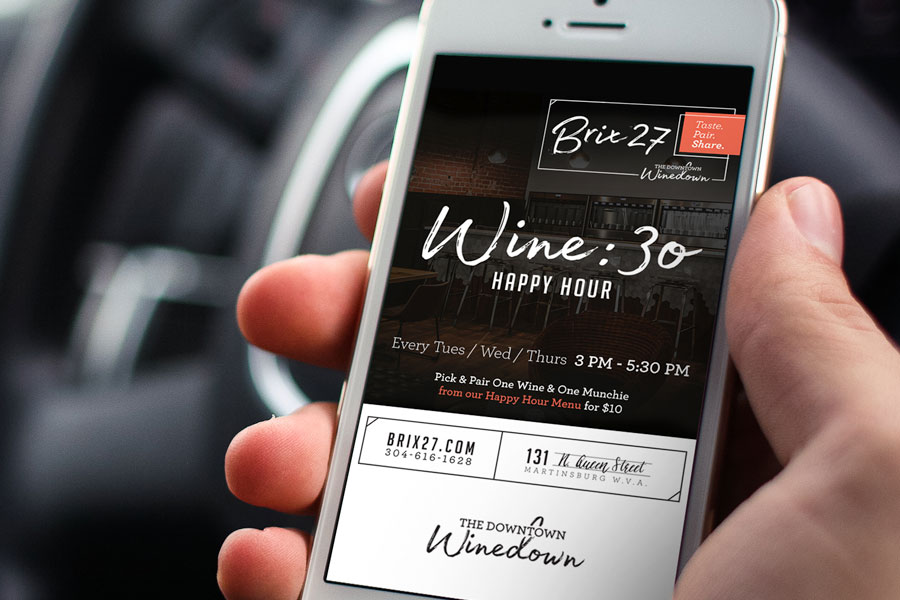
While there are more technical aspects to SEO, two of the most important ones that you can edit today are your page’s titles and meta descriptions.
The title is what is displayed when people see your website link in Google searches. Make sure that your title gets straight to the point of what the page is about and looks professional. Google generally shows around 60 characters of your title, so try to keep it inside of that limit.
Meta descriptions are the introductory text that shows just below the title. These descriptions should also have to do with your company, products, or services, and give people a potential reason to visit the page. Title aside, a meta description is one of the only other things that will help someone decide whether or not they want to click your link. Don’t get too descriptive, though. Google usually can fit around 120 characters on most devices, so try to keep it around that range if you want the whole thing to show.
This doesn’t give Google any queues to the differences between your website pages, nor does it give visitors any clues as to what they’ll be clicking into when visiting. If you run a WordPress site, you can use a free Yoast SEO plugin to easily change both the title and meta description for your website pages.
So, you’ve done everything else on the list and have been keeping up with checking your daily visits and other data. What’s next?
Well, I’m sure you can agree that converting some of that traffic to leads would be nice. SEO performed without a method to convert visitors is essentially pointless, so we recommend making sure you’ve got lots of opportunities for people to convert on your site. At the bare minimum, this is a contact form. It could also include a lead magnet or two as we discussed earlier. If you have a decent amount of call volume or are running paid advertising of any kind, we also recommend getting a good tracking phone number solution – allowing you to track and see incoming call leads.
Sure, you could argue that this has nothing to do with SEO, and you’d be sort-of correct. But I don’t think you’ll ever have someone looking for you online again if you aren’t responding to their inquiries, or are otherwise difficult to contact.
That way you’ll be able to liken your leads to various sources and web pages, to help you figure out what’s working and what you should do more of. And from time to time, make sure your forms are successfully sending you emails! With the ever changing world of email deliverability, it’s good to make sure you aren’t missing out on potential leads because of a spam / security / deliverability issue.
Just tell us where to email a PDF version of this document below.
LovelyPixels’ senior talent helps our customers rank on search engines in Martinsburg, Hagerstown, Winchester, Shepherdstown, Charles Town, Greencastle, Frederick, Berkeley Springs, Harpers Ferry, Morgantown, and all through the State of West Virginia and the nation!
LovelyPixels’ team consists of senior talent and collaborative partnerships that are flexible to your individual business goals.
Your customers are either tuning in or tuning out and our only goal is to develop authentic, quality design work that establishes a connection with your audience.
And it all starts with a casual coffee date.
Marketing Minded Design & Strategy

Check your email for a pinrtable copy of the document,
or simply read the full unlocked document below!